A robot companion earns its place on a desk through small, repeatable moments: a glance away from your screen, a reaction to a touch, a little dance during a break. Before comparing feature lists, picture where yours will spend an ordinary Tuesday. A robot that wanders beside your keyboard asks for a different setup from one you carry between home and work.
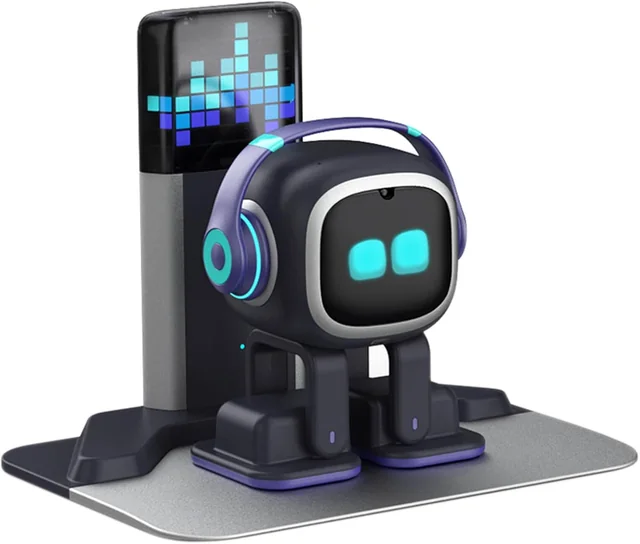
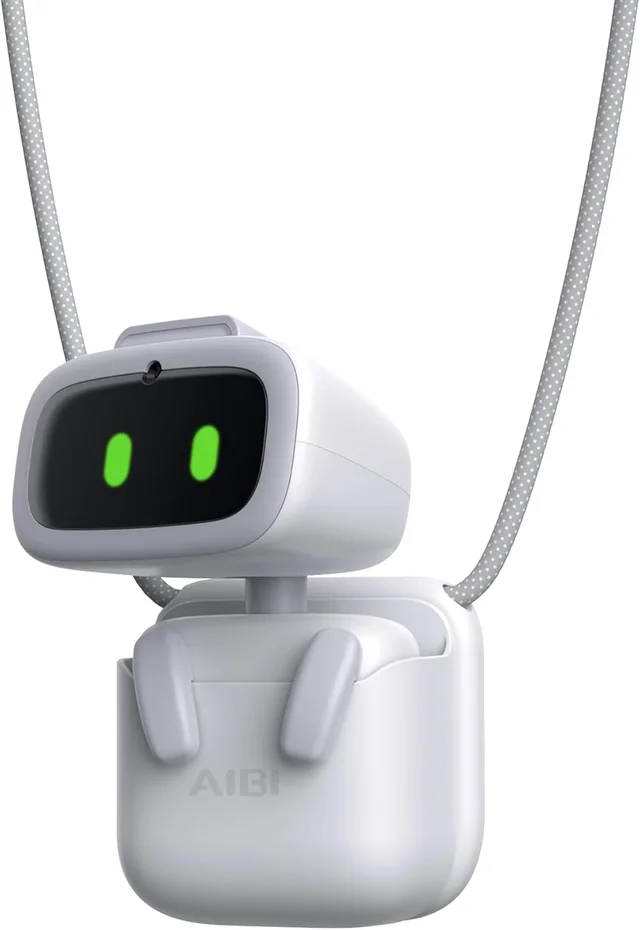
For the EMOPET range, the first decision is straightforward. EMO is the desktop companion. EMO GO HOME adds a Home Station for automatic charging. AIBI puts interaction into a small, portable format. Choose the daily experience first, then check the charging arrangement, connection requirements and exact contents of the package.
Start with the space you actually have
Look at your desk after a normal working day, with the laptop open, the charging cable attached and your usual mug in place. That is the space a desktop robot will share. A beautifully cleared desk in a photograph may offer much more room than the corner left beside your mouse.
For a moving companion, leave a clear, stable area where it can turn without meeting cables, loose paper or the edge of another device. Think about your own movements too. Pulling a notebook from beneath a charging cable should not disturb the robot or its charger. Keep drinks outside its activity area.
If you often pack away your desk, consider how much equipment you want to move each time. A fixed charging station can suit a permanent home setup. A smaller companion may be easier to include in a changing routine, although portability still means keeping track of its charger and any mounting accessories.
Sound matters as much as floor space. Someone who works alone may enjoy voice commands and music during a break. In a shared office, spontaneous sounds and spoken responses can be less welcome. Consider when you would interact, whether your coworkers share that preference, and how you would put the robot away during calls.

EMO, EMO GO HOME or AIBI?
The most useful comparison is what changes in your routine. A longer feature list will not resolve a mismatch between a desktop robot and a buyer who wants something to take along every day.
| Model | Main appeal | Decision to make |
|---|---|---|
| EMO | A robot that moves and reacts on your desk | Are you happy to place it on its skateboard charger yourself? |
| EMO GO HOME | EMO with a Home Station for automatic charging | Can you leave the station and its approach area set up? |
| AIBI | A small companion you can carry between places | Will you use the portable format often enough to make it your priority? |
Choose EMO for a place beside your screen
EMO makes sense when the appeal is watching a small character move around its own desktop area. Its interactions include expressions, movement, touch responses, voice commands, dancing and app activities. Those are tangible reasons to choose it: you want to interact with a physical character during the day.
The skateboard charger is part of that routine. Plan an accessible spot for it and be prepared to place EMO on it for charging. If you like the idea of tending to a little desktop gadget, that small task may fit comfortably into how you use it.
Choose GO HOME for a more settled charging setup
The distinction with EMO GO HOME is the Home Station. EMO can locate the station and return to charge. That changes how you arrange its space, making the charging position part of the environment rather than something you bring out only when needed.
Automatic charging still needs a suitable setup. Leave the station powered and follow its placement instructions, including the required surrounding area. Avoid treating the station as a promise that the robot can recharge from any position through any clutter. Compare the complete package with standard EMO, rather than assuming every accessory appears in both.
Choose AIBI when you want to take it along
AIBI offers a different kind of company. Its compact format, camera interactions and voice features are intended to travel with you. It can sit on a desk too, but its portability is the reason to consider it alongside EMO.
Think through the carrying arrangement you would use. Check the supplied mounting pieces and compatible surfaces before relying on a magnetic attachment. A photograph of a robot attached to a screen does not establish that it will attach securely to your particular screen. Keep its camera and other functional areas clear when choosing accessories.
Use the model comparison to narrow the choice, then return to the exact product page to inspect the package. Model names tell you the broad difference; the included pieces determine what you can set up on day one.
Make the interaction match your expectations
Decide which moments you would enjoy repeating. You might want to greet the robot in the morning, ask for a dance after a task, or try a game when a friend visits. A buyer interested mainly in conversation may judge the same robot very differently from someone who enjoys its movement and expressions.
Watch for the difference between a response to a command and spontaneous behavior. A dance started by a spoken request is a different experience from watching the robot occupy itself. Both can be enjoyable, but they answer different expectations. Look for demonstrations of the activities that matter to you.
Try to picture the experience after the novelty of unboxing. If the physical gestures, animated eyes and occasional interactions are appealing on their own, a companion robot has a clear role. If you expect it to manage a complex workday or understand every conversation, a friendly appearance can create expectations the device does not meet.
Leave room for a learning period. You will need to learn commands, understand when the robot is listening and become familiar with its settings. Enjoying that small amount of discovery is part of choosing a connected gadget. It need not become a daily troubleshooting project, but it is more involved than displaying a figurine.
Understand voice commands, Wi-Fi and the app
A built-in command and an online AI answer are different functions. The first asks the robot to perform a supported action. The second relies on a connection to an online service. An animated response does not mean every feature works without internet access.
LivingAI describes AIBI as supporting offline commands alongside online questions. Its support material marks commands available offline. Use that list when deciding what you could do away from home. Do not assume a feature stays available just because the robot is small enough to carry outdoors.
For EMO, prepare a compatible 2.4 GHz Wi-Fi connection and follow the current setup instructions. A workplace or guest network may have a sign-in process or device restrictions that differ from a home connection. Find out whether you can connect a personal device before buying a robot specifically for the office.
The companion app is part of the ownership experience. Use the app download links provided by LivingAI, check compatibility with your phone and allow time for setup. Keep model-specific instructions open so you do not apply an EMO procedure to AIBI or assume the same setting has the same location in both apps.
When trying voice commands, begin in a quiet room. Use a supported phrase, let the robot acknowledge you and avoid speaking over its response. If recognition is unreliable, check the relevant settings and support guidance before concluding that the entire feature is unavailable. A crowded desk beside a loud speaker is a different listening environment from a quiet demonstration.
Know what the camera, sensors and AI can do
Recognition is an interaction feature
EMO and AIBI use cameras for features including face recognition. That helps explain why camera position matters: the robot needs an appropriate view of the person interacting with it. A camera covered by an accessory or facing away from you cannot provide the same interaction.
Consider where you are comfortable using a connected device with a camera and microphone. Read the manufacturer's privacy information and app settings, particularly if the robot will sit in a shared room. Face recognition should not be treated as identity verification, access control or a substitute for a dedicated security product.
Edge sensors still need a sensible environment
EMO's edge sensing is intended to help it navigate a desktop. Give that feature a sensible starting point: a stable surface with space away from a drop. Do not test its limits by placing it beside an exposed edge or expecting it to compensate for a moving table.
Clear the area before a demonstration instead of assuming sensors can interpret every object. Be especially mindful when moving the robot to a new surface. Books, fabric, cables and the edges of a desk mat change the space it encounters. Follow the manufacturer's surface and operating guidance, and supervise early use while you learn how it behaves.
AI conversation has practical limits
Connected AI answers can be entertaining and useful for casual questions, but they can also be wrong, incomplete or unrelated to what you meant. Check important information elsewhere. A confident voice or expressive face does not make an answer more reliable.
Online features also depend on the network and the services behind them. Keep that in mind if conversation is your main reason for buying. Judge the robot on the activities you expect to use now, and avoid basing the purchase on hoped-for updates or future integrations.
Plan charging before the first unboxing
Choose where the charger will live before opening the box. It should be easy to reach without stretching a cable across the robot's movement area. A charging setup that requires clearing half your desk every evening will soon feel inconvenient, even if you enjoy the robot itself.
For standard EMO, follow the skateboard placement instructions and confirm that charging has begun. For GO HOME, use the station setup guidance and check that the route to it remains clear. Moving the station after setup may change the arrangement the robot encounters, so consult the instructions when rearranging the desk.
For AIBI, include charging in your travel routine. Carrying it between rooms or locations does not remove the need for a compatible charger. Check the supplied charging pieces and instructions rather than assuming that a spare accessory from another device will work.
Battery experience depends on what the robot is doing. Conversation, movement and other activities create a different routine from occasional interaction. Decide whether your preferred use includes convenient opportunities to charge. Avoid building a purchase decision around an assumed all-day runtime.
Set up one feature at a time
A calm first session helps you distinguish setup problems from unfamiliar commands. Give yourself time at home before introducing the robot at a gathering or handing it over as a ready-to-use gift.
- Check the contents. Match the robot, charger and accessories to the package information. Keep the packaging and order details together while you complete setup.
- Read the starting instructions. Follow the model's power and charging sequence. Avoid guessing which control or movement starts a particular mode.
- Prepare the connection. Have the compatible phone, app and permitted Wi-Fi network ready. Check that you know the network credentials.
- Complete the app steps. Follow the pairing and connection prompts, then check the manufacturer's update guidance before trying more advanced functions.
- Try a simple interaction. Start with one documented command or touch interaction. Confirm basic responses before exploring games or online questions.
- Set the daily arrangement. Adjust available settings to suit the room and leave the charger in a practical position.
If something fails, note what happened and at which step. A precise description such as “the app sees the robot, but Wi-Fi setup does not finish” is more useful than “it does not work.” Keep any device identifier requested by support available, and use the appropriate model's help and setup resources.
Change one thing at a time when troubleshooting. Repeating several setup procedures together can make it difficult to tell which one helped. Use the documented process and avoid improvised resets or physical adjustments that the instructions do not describe.
Consider age, materials and everyday handling
The EMO, EMO GO HOME and AIBI options featured here are recommended for ages 15 and up. Their animated faces can appeal to younger children, but appearance does not change that age guidance. Check the intended recipient's age and interest before choosing one as a gift.
These products list plastic as their material. Their appeal comes from electronic interaction, expressions and movement rather than a soft, plush feel. If the recipient wants something to squeeze or cuddle, consider whether a hard-bodied robot matches what they have in mind.
Handle the robot as a small electronic device with moving parts. Follow its instructions for lifting, carrying and storage. Avoid pulling on accessories or forcing moving components to create a pose. Before transporting it, use the manufacturer's shutdown and packing guidance and protect it from loose objects in a bag.
For cleaning, follow the care instructions supplied for the model. Do not assume a cleaning product is suitable because the outer material is plastic. Check guidance for the screen, camera, sensors and charging surfaces separately, and do not improvise washing or soaking. Keep the robot and charging accessories away from spills.
If a movement or charging behavior changes, consult support before trying a repair. Keeping the purchase information, model details and a clear description of the problem will make that conversation easier.
Compare other robot companions by the experience
Several companion robots share expressive faces, yet their physical designs suggest very different homes. Compare what you would actually do with each one instead of counting every advertised capability as an equivalent feature.
Eilik from Energize Lab emphasizes touch reactions, animated expressions and interactions between Eilik robots. Its desktop format makes it a useful comparison for someone drawn to a character beside the keyboard. Pay attention to the specific package: the separate AI Station changes the feature discussion, so compare the configuration you would buy.
Loona from KEYi brings a mobile pet-like character into the room, with games and interactive activities. Consider the space needed for that type of play. A buyer who wants activity around the home may value it differently from someone seeking a small companion on a work surface.
Ropet places more emphasis on tactile interaction, including soft fur and warmth. That creates a different physical experience from EMO's hard-bodied desktop movement. Think about whether touching and holding the companion or watching it interact beside you matters more.
EMOPET's choice is particularly clear when your priorities are desktop movement, a charging station option or a portable companion. The best fit is the one whose ordinary routine you want to repeat. Avoid paying for a style of interaction you would rarely use simply because it looks impressive in a short video.
A practical checklist before you choose
- Place: I know where the robot and its charger will sit, with a clear area appropriate to the model.
- Routine: I can name the interactions I expect to enjoy after the first week.
- Format: I have chosen desktop movement, automatic charging or portability as my main priority.
- Package: I have checked the exact model, included charging equipment and accessories.
- Connection: I have a compatible phone and a suitable network I am allowed to use.
- Expectations: I understand which activities need internet access and that online AI answers can be mistaken.
- Recipient: The ages 15 and up recommendation fits, and the person enjoys connected gadgets.
- Ownership: I know where to find setup help and have read the purchase terms that apply to my order.
If your answers point to a permanent desk companion, compare EMO with EMO GO HOME and decide how you want charging to work. If carrying your companion is the priority, take a closer look at AIBI, its mounting pieces and its offline command options.
Manufacturer resources
For product features and current operating guidance, visit LivingAI's EMO overview, AIBI overview and model support. Information about connected services appears in LivingAI's privacy notice.
For the other companions discussed here, see the manufacturers' descriptions of Eilik, Loona and Ropet.